LinkedIn text formatter, right in the post box
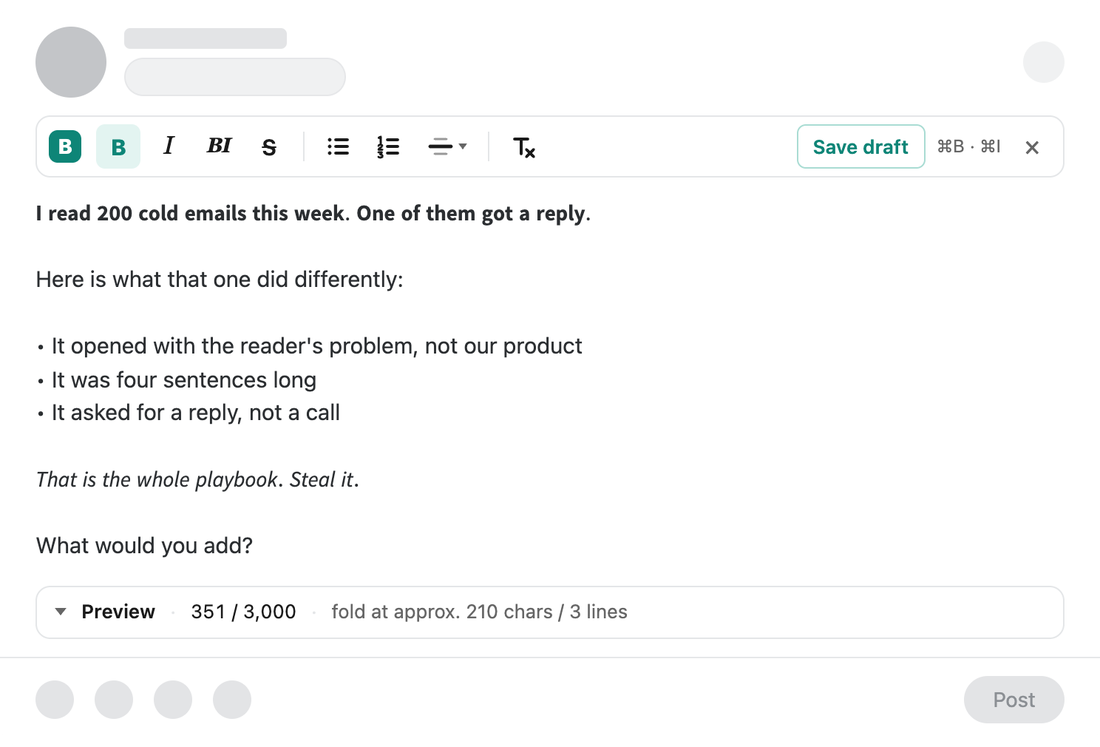
Select a phrase, click B, and it stays bold in the feed. Italic, lists and dividers work the same way, and a small preview shows where the …more fold cuts your post.
Add to ChromeComing soon to the Chrome Web Store.
A Chrome extension. Your posts and drafts stay in your browser.
How it works
- Start a postOpen LinkedIn and click Start a post. The formatting bar appears above the box.
- Select and clickSelect a phrase and click B or I, or press Cmd+B or Ctrl+B. Cmd+Z undoes it.
- Check the foldOpen Preview to see the first lines as the feed shows them, on a computer or a phone.
Why the letters stay bold
LinkedIn posts are plain text, so there is no real bold. A text formatter swaps your letters for Unicode symbols that look bold or italic, and they keep that look wherever the post is shown. The same trick has a cost: screen readers may spell those symbols out and search does not match them to plain words. That is why the bar warns you when most of a post is styled or when a hashtag is styled, and a Remove styling button turns everything back.
Where the fold falls and the 3,000 limit
The feed shows about 210 characters or 3 lines of a post on a computer and about 140 characters or 2 lines on a phone before the …more link. LinkedIn does not publish these numbers, so the preview calls them approximate. A post can hold up to 3,000 characters; the counter counts styled letters on the high side and turns red when you go over.
Questions
Is this a website or an extension?
An extension for Google Chrome. It adds a small formatting bar above the LinkedIn post box, so you style the post where you write it, without copying text to a converter site and back.
Will bold and italic show up for my readers?
Yes. The styled letters are Unicode symbols, so they look the same in the feed on computers and phones. Very old devices may show empty boxes.
Does it send my posts anywhere?
No. The extension reads only the post you are writing, keeps drafts in your browser and makes no network requests. There is no account and no sign-up.
How the extension handles your data: privacy policy.